Every order on one board, whatever door it came in through.
Typed in, imported from a spreadsheet, pushed from your store or created over the API — every order lands in the same place with its address geocoded, its window applied, and nothing retyped by anyone.
In the product
The same orders, at the desk and on the go.
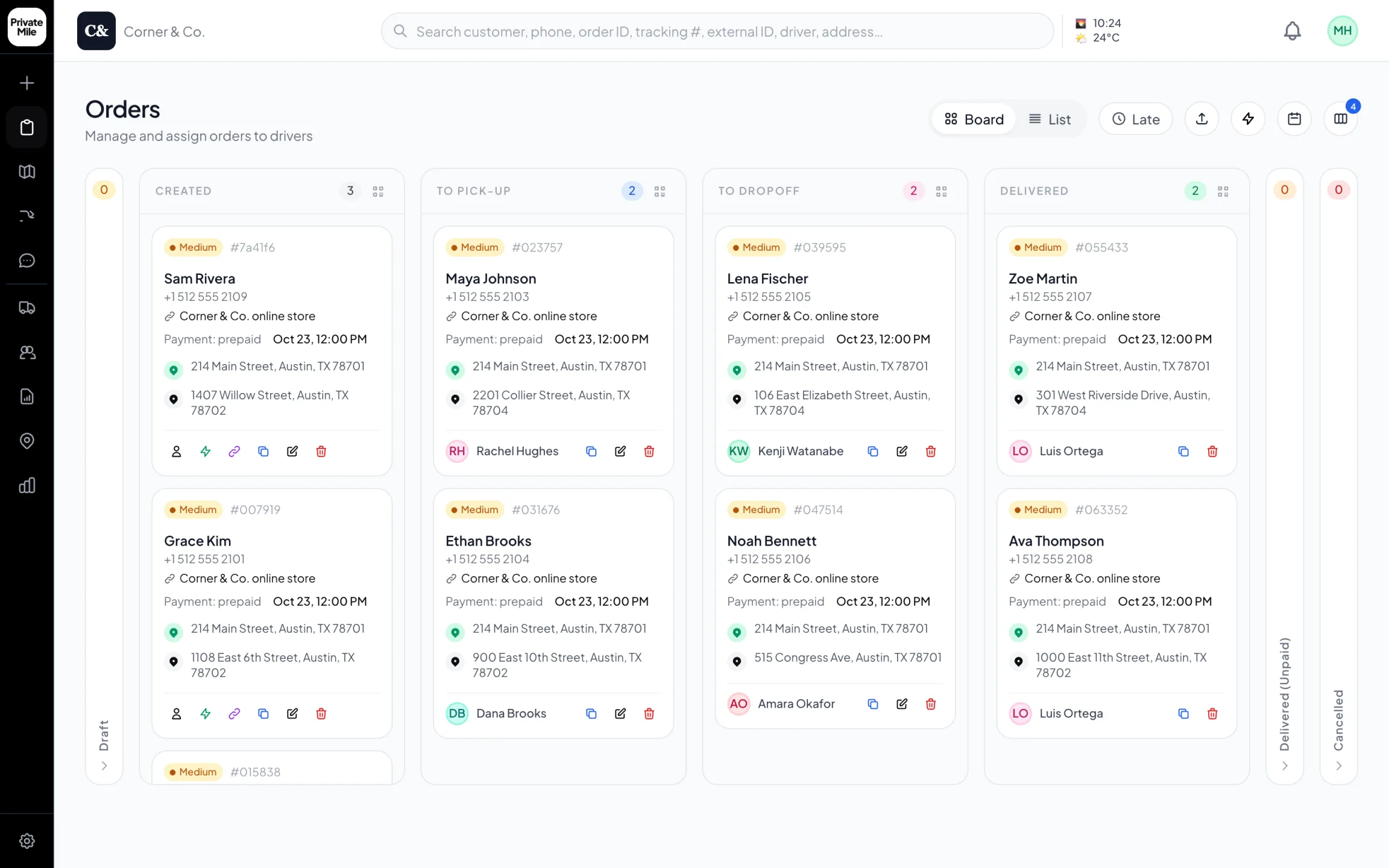
Dispatch board
Every order on one board, the moment it’s placed — online store orders included.
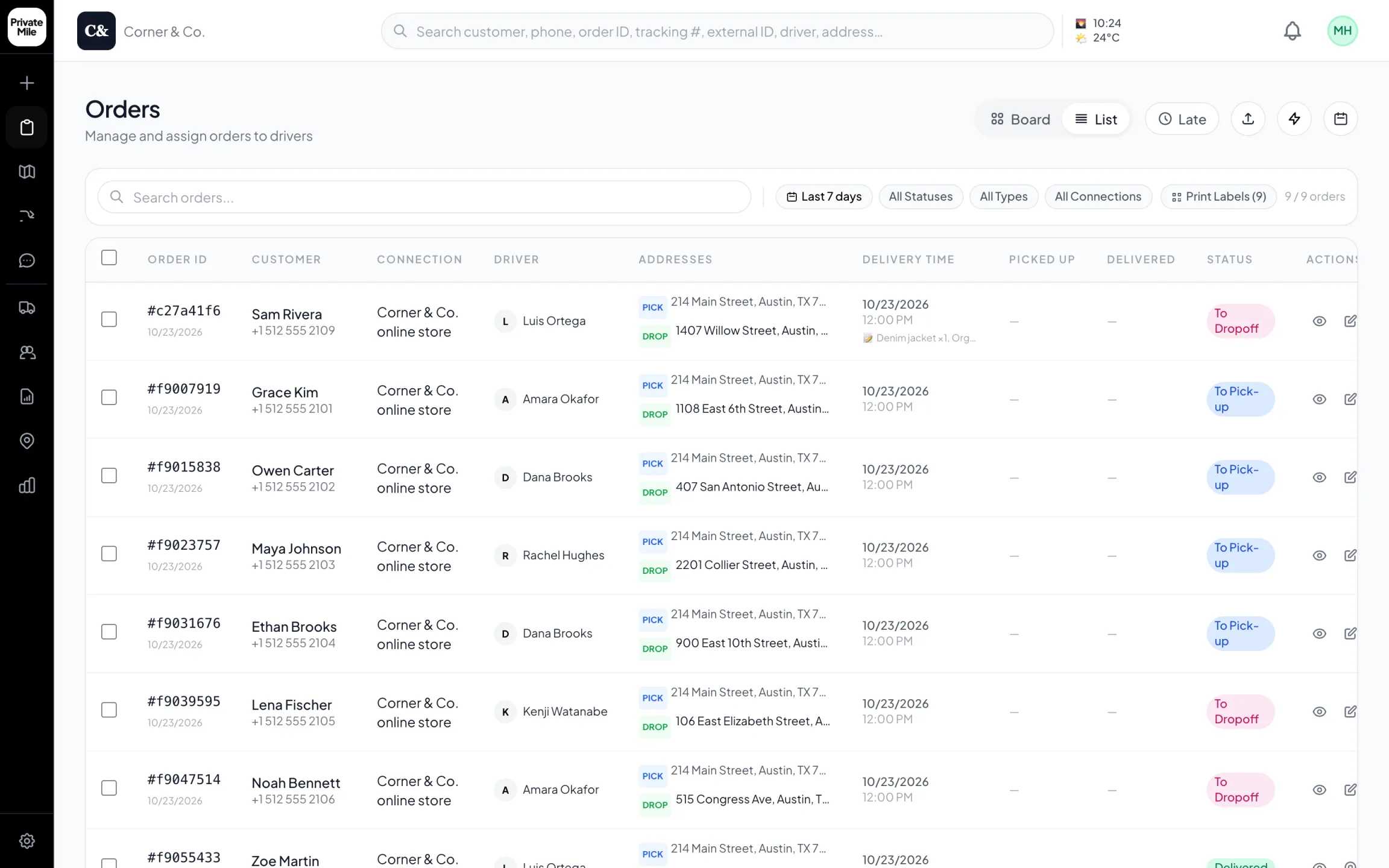
Orders · list
The same orders as a list: connection, driver, both addresses, times and status, with labels to print.
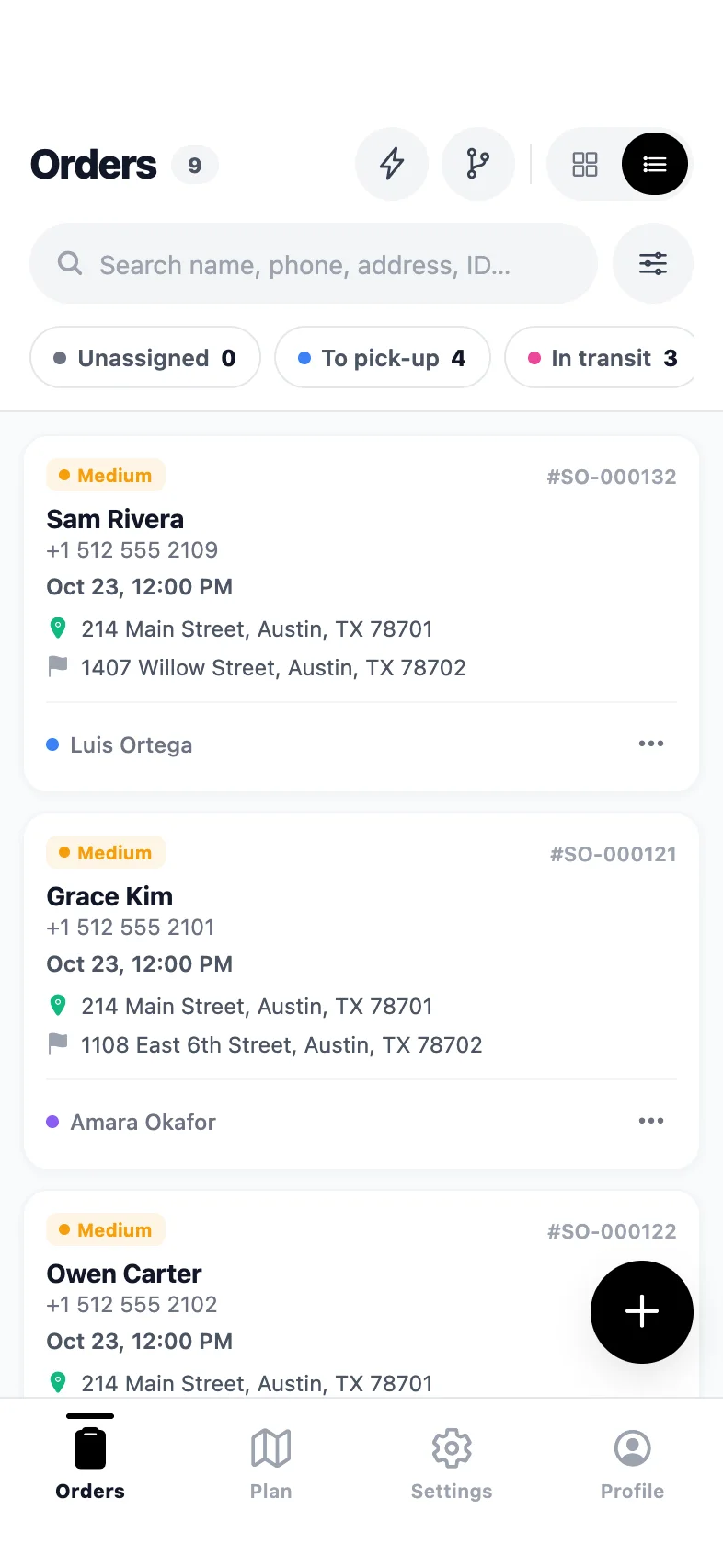
Admin app · Orders
The whole board in your pocket — search, filter, assign.
Why order management matters
What it changes on a delivery day.
Four ways in, one board
Store webhooks, CSV import, the REST API, or the board itself. However an order arrives it carries the same fields and follows the same rules.
Bulk work stays bulk
Import up to 2,000 rows with a per-row error report, then assign, re-window or reschedule whole groups of orders without opening them one at a time.
Addresses that resolve
Every address is geocoded on arrival. The ones that fail, or land on a town centre, are flagged before they cost a driver ten minutes on the road.
The fields your operation needs
Delivery windows, priorities, references, line items, customer notes and custom metadata travel with the order to the driver's screen.
How it works
Order management in PrivateMile.
01
Orders arrive
A store webhook, a spreadsheet import, an API call or a form on the board. The address is geocoded, the window applied, and the order joins the day.
02
The board carries them
Filter by status, zone, driver or window. Act on one order or two hundred — assign, re-sequence, reschedule, cancel — from the same screen.
03
Each one ends with proof
Assigned, en route, arrived, completed with the proof your rules require, or failed with a reason and a photo. The history stays on the order.
The board is the operation
Almost every problem in local delivery is visible on one screen or invisible entirely. Orders in three systems — email, a spreadsheet, the phone — means the day exists only in somebody’s head, and the first sick day costs you a morning of reconstruction.
So the board is deliberately the single place: every order, whatever it came in on, with the same fields and the same lifecycle. Nothing is retyped between the store and the driver, because retyping is where addresses get broken.
Addresses are the expensive part
A delivery operation’s address book is usually worse than anyone believes. Duplicates entered three ways, unit numbers missing, postcodes that resolve to a town centre two miles from the door.
Geocoding on arrival makes that visible immediately rather than at 3pm on the road. Fleets that clean the flagged addresses once routinely find a few percent of their book was quietly costing a driver ten minutes a stop — which is real money once you multiply it by a year.
Bulk stays bulk
Operations that plan the next day in the evening do it in groups: import the file, apply a window to a batch, assign a zone to a team, reschedule everything that did not fit. Doing that one order at a time is how planning eats an evening.
Import with a per-row error report, multi-select on the board, and batch actions for assignment, windows and rescheduling exist so the group stays a group.
One lifecycle, kept honest
Created, assigned, en route, arrived, completed or failed — with arrivals detected by geofence rather than by a tap, and completions gated on the proof your rules require. Every state change carries a timestamp, which is what makes the reporting worth reading later: the numbers come from what happened rather than from what was planned.
Also in the box
And everything else, on every plan.
Bulk import
Up to 2,000 orders per CSV with per-row error reports.
Integrations & API
Shopify, WooCommerce, Zapier, webhooks, REST API.
Zones & warehouses
Multi-depot operations with geofenced service areas.
Carrier handoff
Route overflow to FedEx, UPS, DHL with live tracking.
How many orders can I import at once?
Up to 2,000 rows per CSV, with a per-row error report so a single bad address does not reject the whole file. Failed rows can be fixed and re-imported.
Can orders come in automatically from my store?
Yes — Shopify, WooCommerce, BigCommerce, Wix and Ecwid connect by webhook, and Zapier or the REST API cover everything else. Orders arrive with the customer, address, line items and checkout note.
What happens to an address that will not geocode?
It is flagged rather than silently accepted at a wrong location, so somebody can correct it before a driver is sent. Bad addresses are one of the largest hidden costs in local delivery.
Can I attach my own fields to an order?
Yes. Custom metadata and references travel with the order through dispatch to the driver's screen and into the exported data, so your own identifiers stay attached end to end.
More features
The rest of the platform.
See it with your own orders on the board.
Import today’s deliveries, add your drivers, and run one real day on the 15-day trial — no card, no sales call required.
Questions first? Tell us about your delivery day — or sign in.