Know where every driver is, and which order is about to be late.
A live map of the whole fleet, ETAs that recalculate as drivers actually move through traffic, arrivals detected automatically at the door, and a flag on the board when an order is on track to miss its window.
In the product
Live for the dispatcher. Live for the customer.
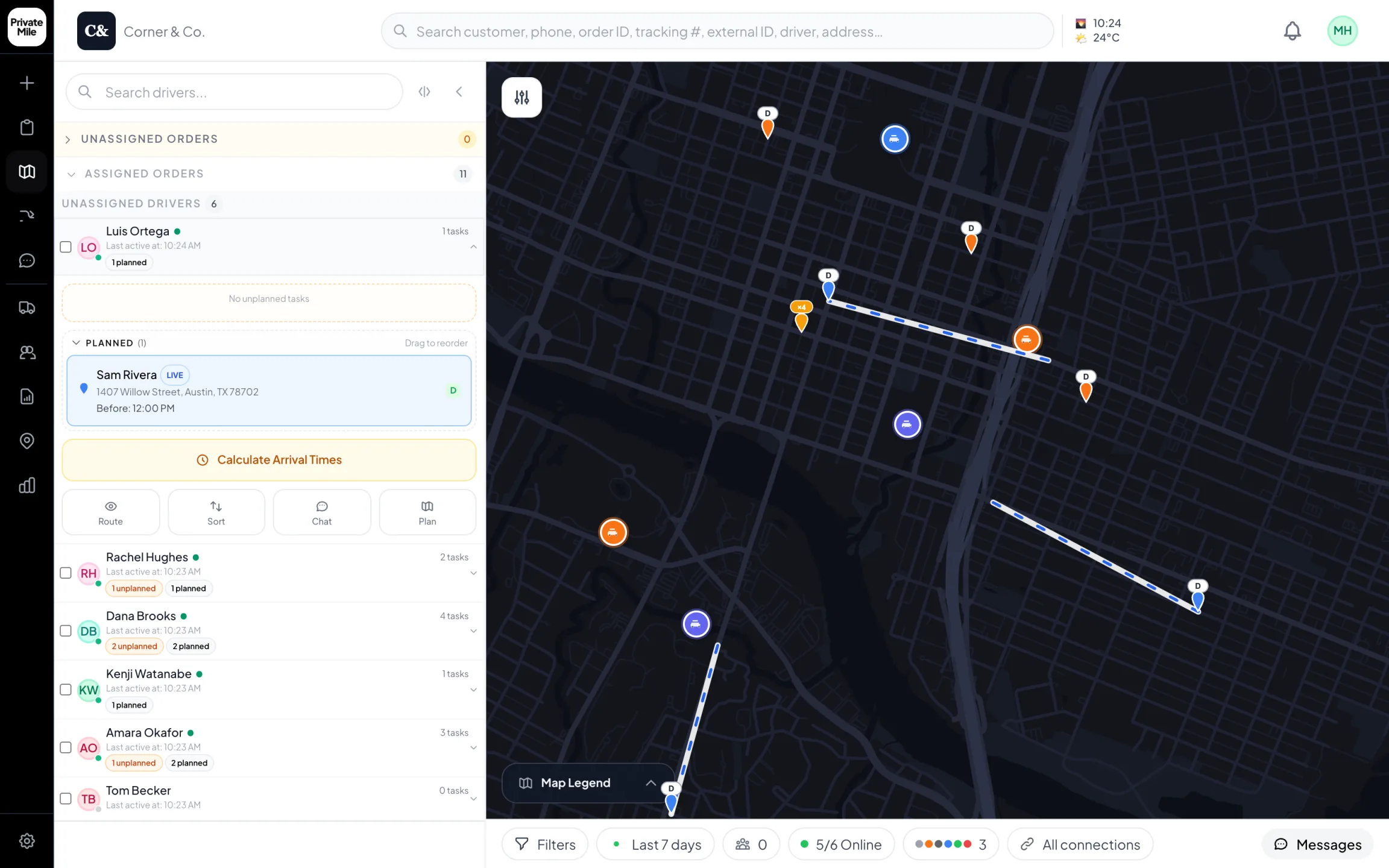
Planning map
Every driver live on one map. Open a driver to see the stop they’re on and the ones after it.
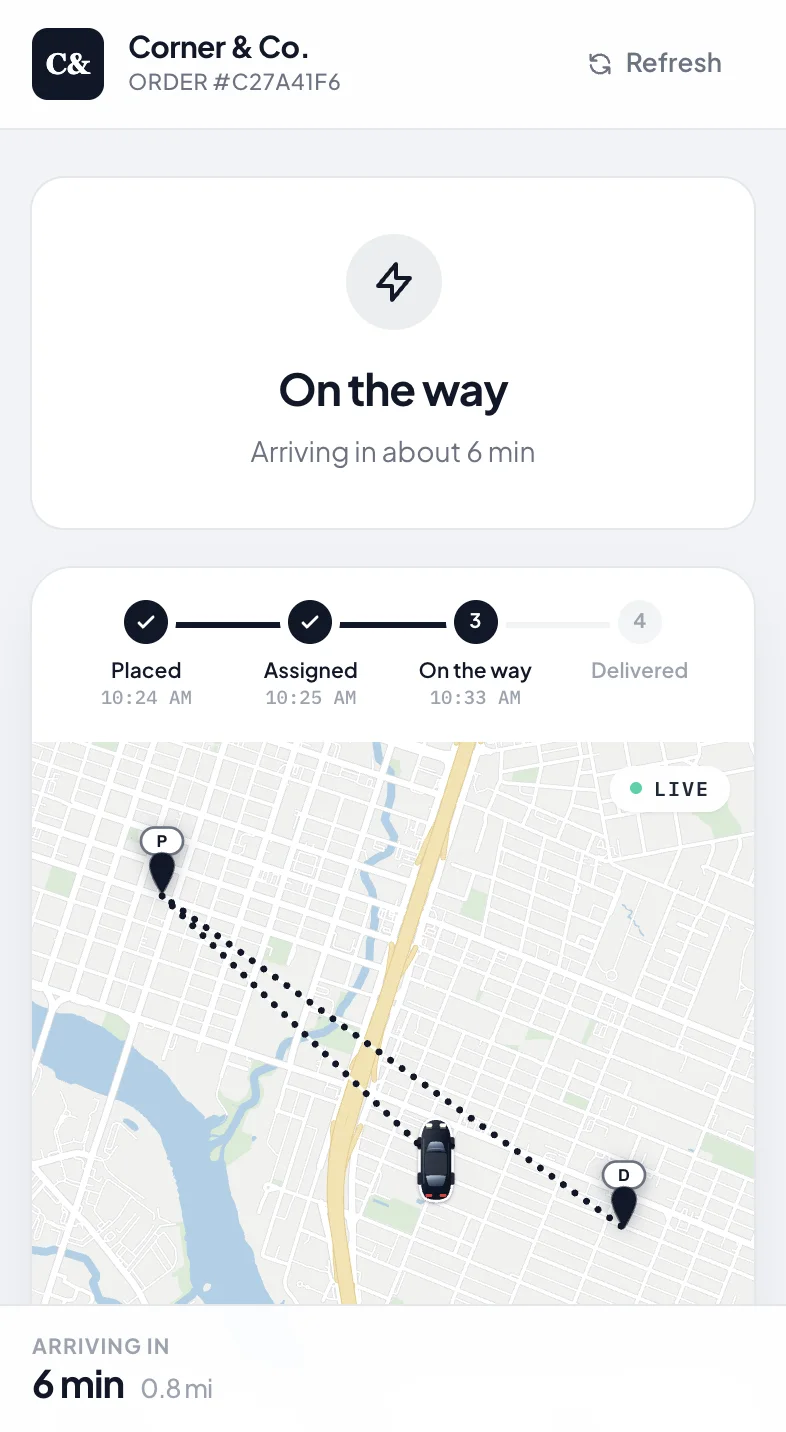
Tracking page
No app needed: a tracking link under your name, live while it’s on the way.
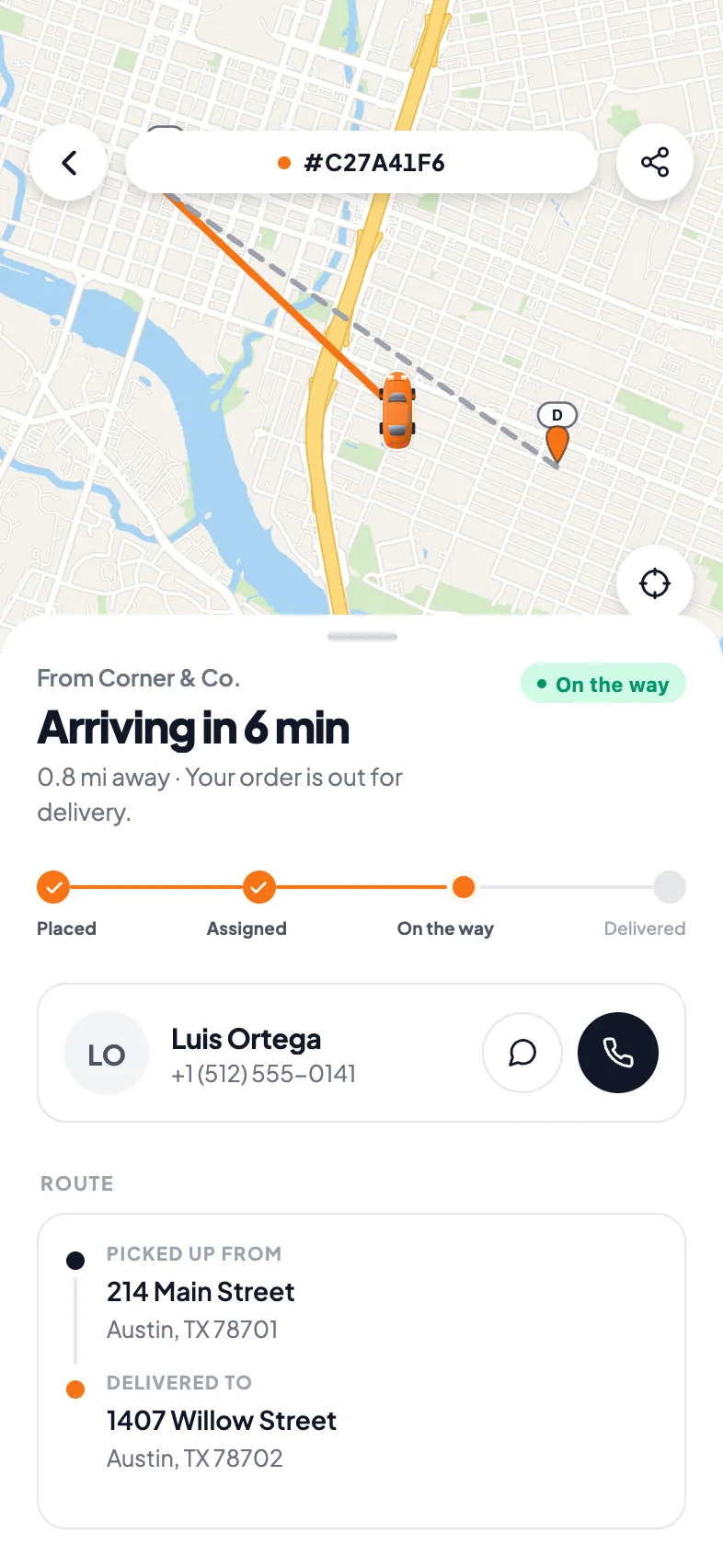
Customer app · Live tracking
The driver on the map, the arrival time and a way to reach them.
Why live tracking matters
What it changes on a delivery day.
The whole fleet on one map
Every driver, every route, every stop and its status in one view — with historical playback when you need to reconstruct what happened.
ETAs that change with traffic
A static morning ETA is a guess by noon. These recalculate as drivers move, so the number on the board is the number worth telling a customer.
Warned before it is late
When an order is on track to miss its window, it is flagged on the board while there is still time to move it or call ahead.
Arrival without a tap
A geofence around each stop marks the arrival automatically, so the timeline stays honest even when a driver forgets to press anything.
How it works
Live tracking in PrivateMile.
01
Drivers appear as they start
The driver app reports location on shift. The board shows each driver, their remaining stops, and how the day is tracking against plan.
02
ETAs recalculate continuously
Every position update refreshes the ETA for the remaining stops, on the board and on the customer's tracking page at the same time.
03
Problems surface before customers call
Predicted-late orders, stalled drivers, a phone about to lose battery, a GPS signal that dropped — each raises an alert with a specific decision attached.
Tracking is only useful if it changes a decision
A map of moving dots is satisfying and, on its own, not worth much. What makes tracking valuable is the moment it turns into an action: this order is going to miss its window, and there are twenty minutes left to do something about it.
That is why live tracking here is wired to alerts rather than sitting on its own screen. Positions feed ETAs, ETAs are compared to promised windows, and the board raises the specific orders that need a human — instead of asking a dispatcher to watch a map all afternoon and notice.
The timeline has to be honest
Every ETA downstream is computed from the last known state, which is why arrival detection matters more than it appears to. Drivers forget to tap “arrived” — not out of carelessness but because their hands are full and there is a door in front of them.
Geofenced arrival closes that gap. The app notices the driver reached the stop, the timeline records it, and the rest of the day’s estimates stay accurate without anyone being asked to remember anything.
Ops alerts, not just delivery alerts
Some problems are not about the order at all. A driver’s GPS drops out. A phone battery is about to die mid-route. A driver has not moved in forty minutes. Each of those quietly degrades every ETA you are showing customers, and each raises its own alert here so it can be fixed before it becomes six late deliveries.
What the customer sees
The same underlying data drives the customer’s view, which is the point — one source of truth, not a separate estimate. They get a branded page with the driver approaching, a live ETA, and an arriving-soon message a few minutes out. The “where is my order?” call stops because the answer is already on their phone.
Also in the box
And everything else, on every plan.
Live GPS tracking
Every driver on one map, updating in real time.
Smart notifications
SMS, email, and push on every status change.
Proof of delivery
Photo, signature, notes — and QR-verified parcel handoffs.
Analytics & reports
On-time rates, driver leaderboards, scheduled exports.
How often does driver location update?
Continuously while a driver is on shift, with the map and every dependent ETA updating in near real time. Location is reported by the driver app only during working hours.
How does predicted-late detection work?
Each order's live ETA is compared against its promised window as the day runs. When the ETA crosses the end of the window, the order is flagged on the board — usually with enough warning to move the stop or call the customer first.
Do drivers have to mark themselves as arrived?
No. A geofence around each stop detects the arrival automatically. Drivers can still act manually, but the timeline does not depend on them remembering.
Can customers see the driver on a map?
Yes, on a branded tracking page you control — with a live ETA and an arriving-soon notification, without exposing anything about your other deliveries.
More features
The rest of the platform.
See it with your own orders on the board.
Import today’s deliveries, add your drivers, and run one real day on the 15-day trial — no card, no sales call required.
Questions first? Tell us about your delivery day — or sign in.