Assign by rule, not by shouting across the office.
Auto-dispatch picks the right driver for each order against rules you set and assigns it in seconds. The routine work happens on its own; the dispatcher handles the exceptions, which is the part a human is actually better at.
In the product
One click on the board. On the driver’s phone a second later.
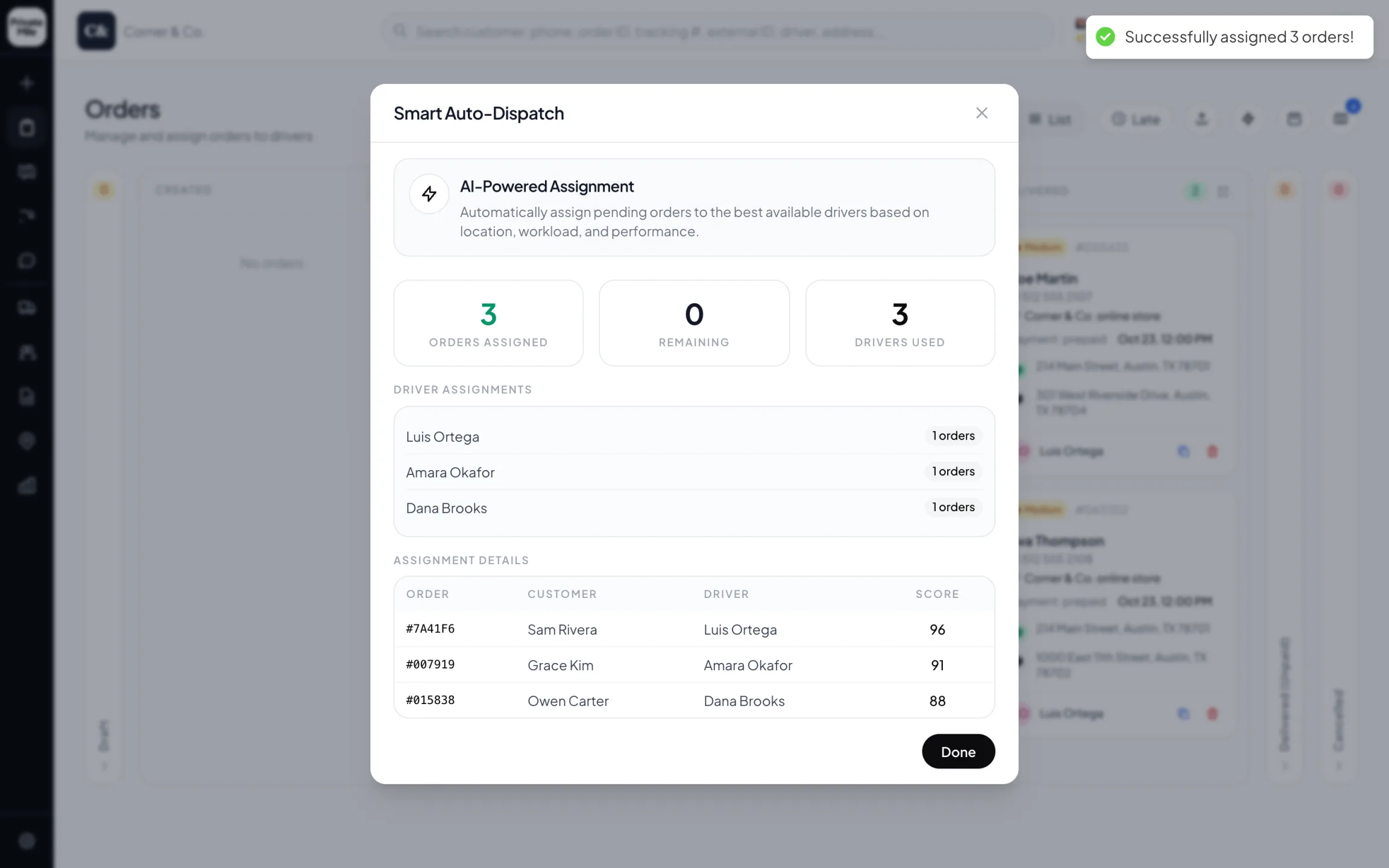
Smart Auto-Dispatch
Three pending orders placed in one click — each with the driver chosen and the score behind it.
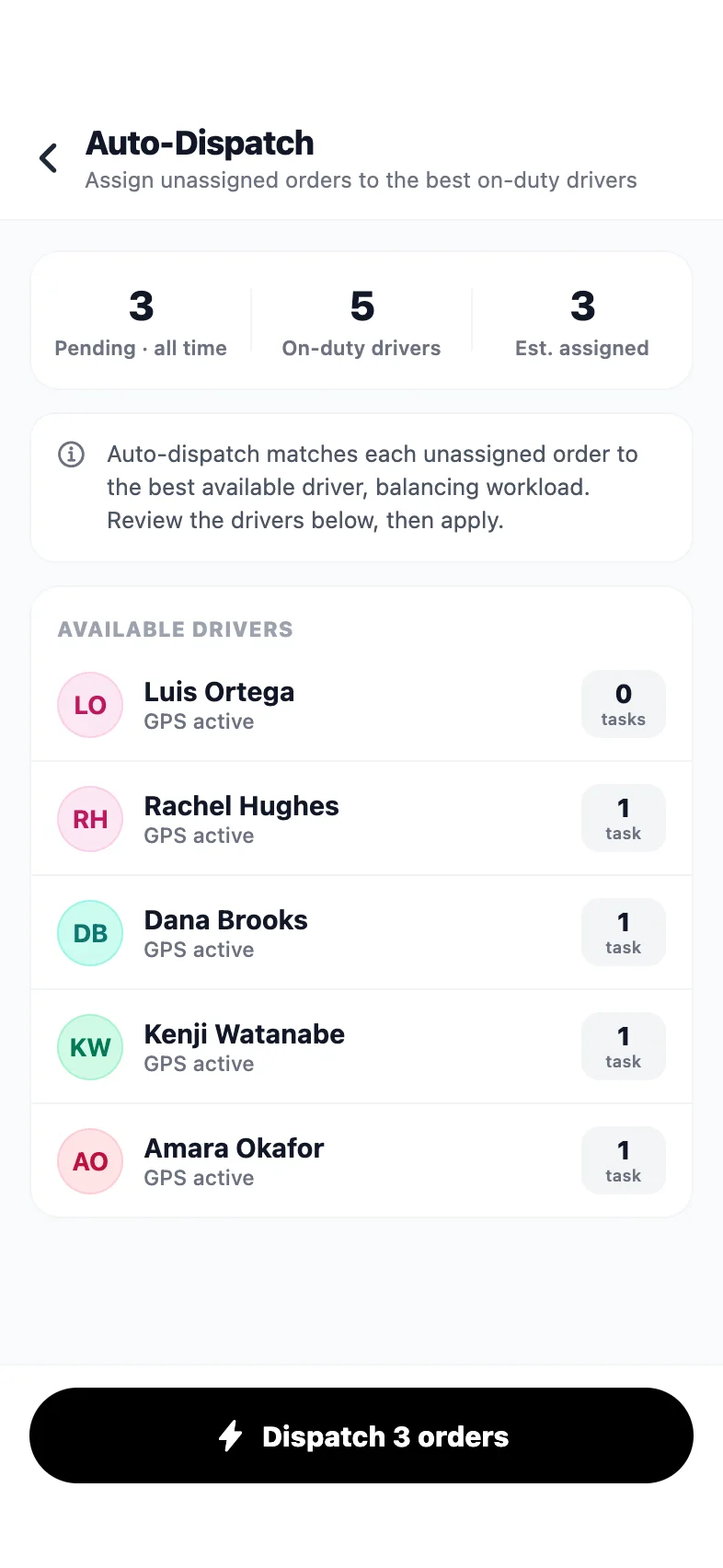
Admin app · Auto-dispatch
Dispatch every pending order from your phone — the drivers and their workload first.
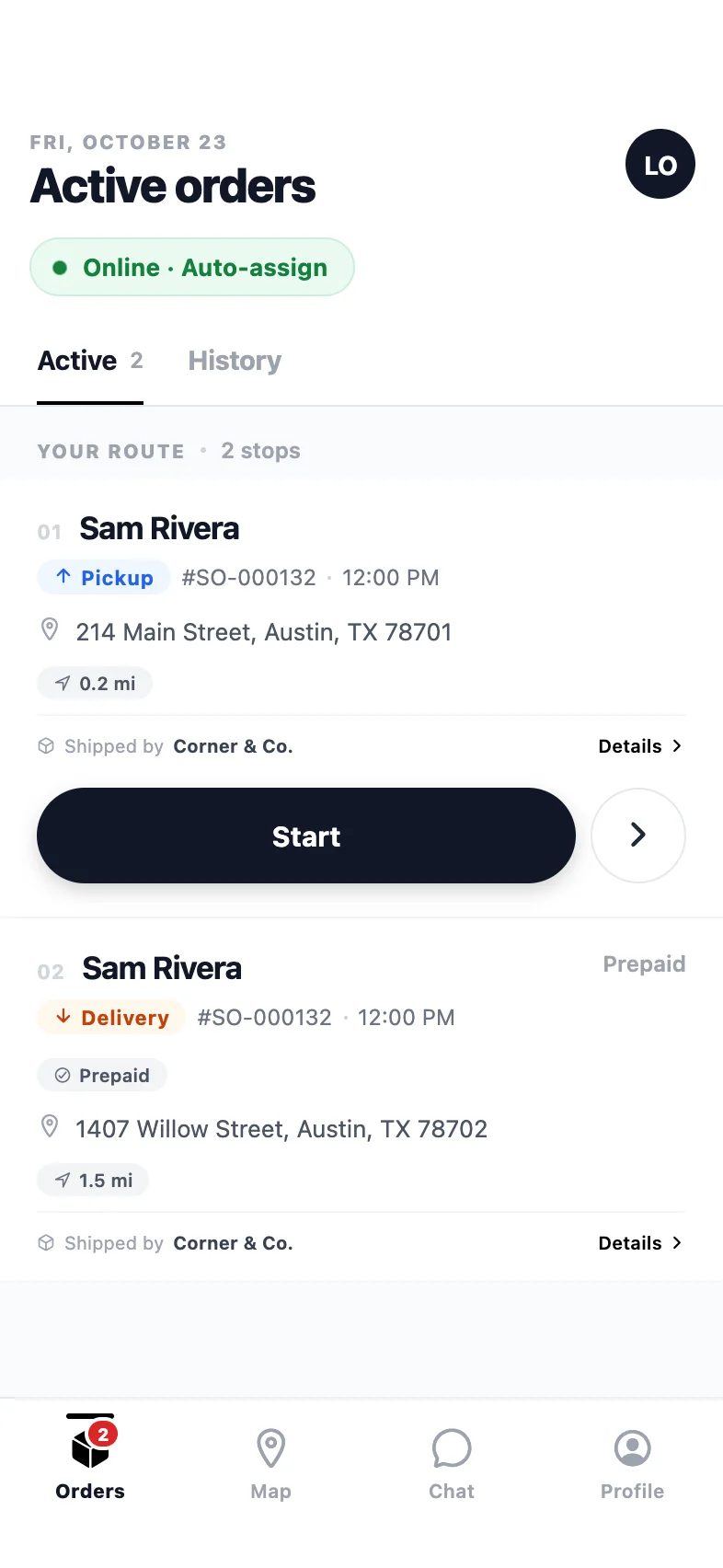
Driver app
The route in order: pickup first, then the drop-off, one clear action per stop.
Why auto-dispatch matters
What it changes on a delivery day.
Four rules, your choice
Nearest available driver, fair rotation, load-balanced, or by zone. Set it per organization and change it when the shape of the operation changes.
Nothing applied behind your back
Auto-dispatch can run hands-off or propose and wait. Anything unusual can require a human confirmation before it reaches a driver.
An AI copilot for the exceptions
Ask in plain language — “who can take two more stops in the east?” — and the copilot answers, proposes, and applies only what you confirm.
Seconds, not minutes
An order marked ready is on a driver's phone before the bag is sealed. Over a day of forty orders that is most of a dispatcher's morning back.
How it works
Auto-dispatch in PrivateMile.
01
Set the rule once
Choose how orders should be assigned — nearest, round-robin, load-balanced, or by zone — and which orders auto-dispatch is allowed to handle on its own.
02
Orders assign themselves
As each order becomes ready, the rule runs against available drivers, their current load and their zone, and the assignment appears on the driver's phone.
03
You handle what the rule cannot
Fragile stops, VIP customers, the driver who is new this week. Exceptions surface on the board for a human, and the copilot can propose options for them.
What auto-dispatch actually removes
The work it takes away is not thinking — it is the twenty seconds of lookup that happens forty times a morning. Who is closest. Who is already carrying eleven stops. Who is on the north side today. A dispatcher doing that by memory under pressure makes the same mistake repeatedly: the order goes to whoever is top of mind, not to whoever should have it.
A rule does that lookup instantly and identically every time, which is exactly the kind of task worth automating.
Choosing the right rule
Nearest available suits on-demand work where speed to the door is the point, and it is the rule most likely to leave one driver with a heavy afternoon.
Round-robin distributes fairly by count. It suits fleets where drivers are paid per stop and fairness is a live issue.
Load-balanced keeps stop counts and route lengths comparable across the fleet. It is usually the best default for scheduled local delivery.
By zone assigns within a territory. It suits operations where drivers know their patch and the address book has real depth.
Most fleets start load-balanced, then move to zones as territories firm up.
Keep the exceptions human
Auto-dispatch is at its best handling the ninety percent of orders that are unremarkable. The remainder — the fragile item, the customer who has already complained once, the new driver’s first week — are decisions with context that lives in someone’s head.
So the design here is deliberate: rules handle the routine, exceptions surface on the board, and the AI copilot helps with the middle ground by proposing options in plain language and waiting for a yes. Nothing is applied without confirmation when you have asked for confirmation.
It works with planning, not against it
Assignment and sequencing are different problems. Auto-dispatch decides who; route planning decides in what order. They run together here: an order assigned by rule lands in a driver’s route, the route re-sequences, and the ETA recalculates — without anyone reopening the plan.
Also in the box
And everything else, on every plan.
AI dispatch copilot
Create, assign, and query orders in plain English.
Zones & warehouses
Multi-depot operations with geofenced service areas.
Live GPS tracking
Every driver on one map, updating in real time.
Driver chat
Built-in messaging between dispatch and the field.
What assignment rules are available?
Nearest available driver, round-robin for fair rotation, load-balanced so nobody ends the day with twice the stops, and zone-based so a driver stays in their territory. The rule is set per organization and can be changed at any time.
Can I keep a human in the loop?
Yes. Auto-dispatch can assign directly, or propose an assignment and wait for confirmation. Many teams run it hands-off for routine orders and require confirmation for anything flagged.
What is the AI dispatch copilot?
A plain-language assistant on the board. Ask it to find capacity, assign a group of orders to a team, or answer a question about the day, and it proposes an action you confirm before anything is applied.
What happens if no driver is available?
The order stays unassigned on the board and is flagged rather than silently queued, so dispatch can decide: hold it, move it to tomorrow, or hand it to a driver coming back to the depot.
More features
The rest of the platform.
See it with your own orders on the board.
Import today’s deliveries, add your drivers, and run one real day on the 15-day trial — no card, no sales call required.
Questions first? Tell us about your delivery day — or sign in.