Plan the day against the clock, not just the map.
Group the day by area, drag stops onto drivers, or let the optimizer propose a shorter order that still respects every delivery window. You review it as a list and on the map before anything reaches a driver.
In the product
Plan on the big screen, check from your phone.
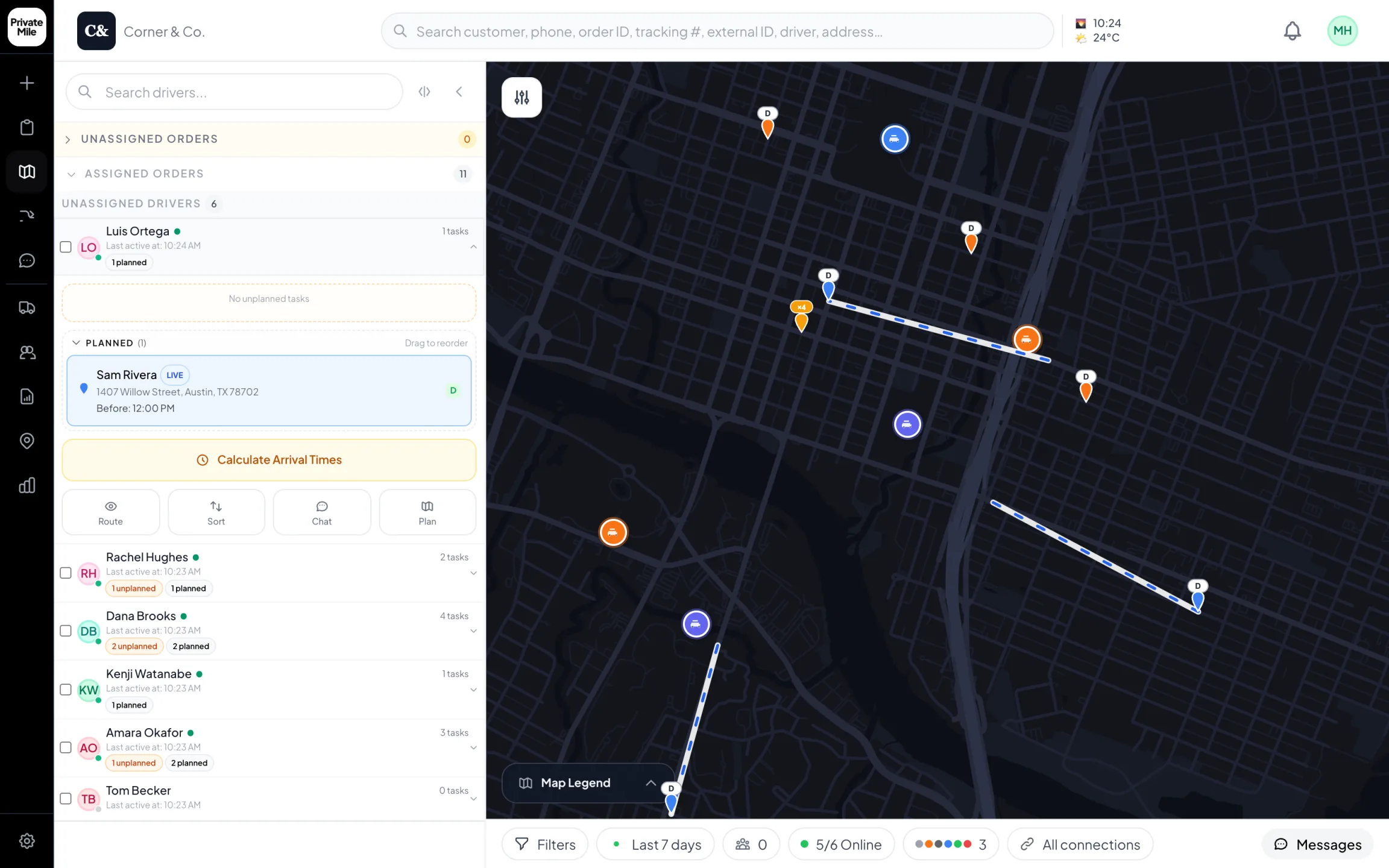
Planning map
Every driver live on one map. Open a driver to see the stop they’re on and the ones after it.
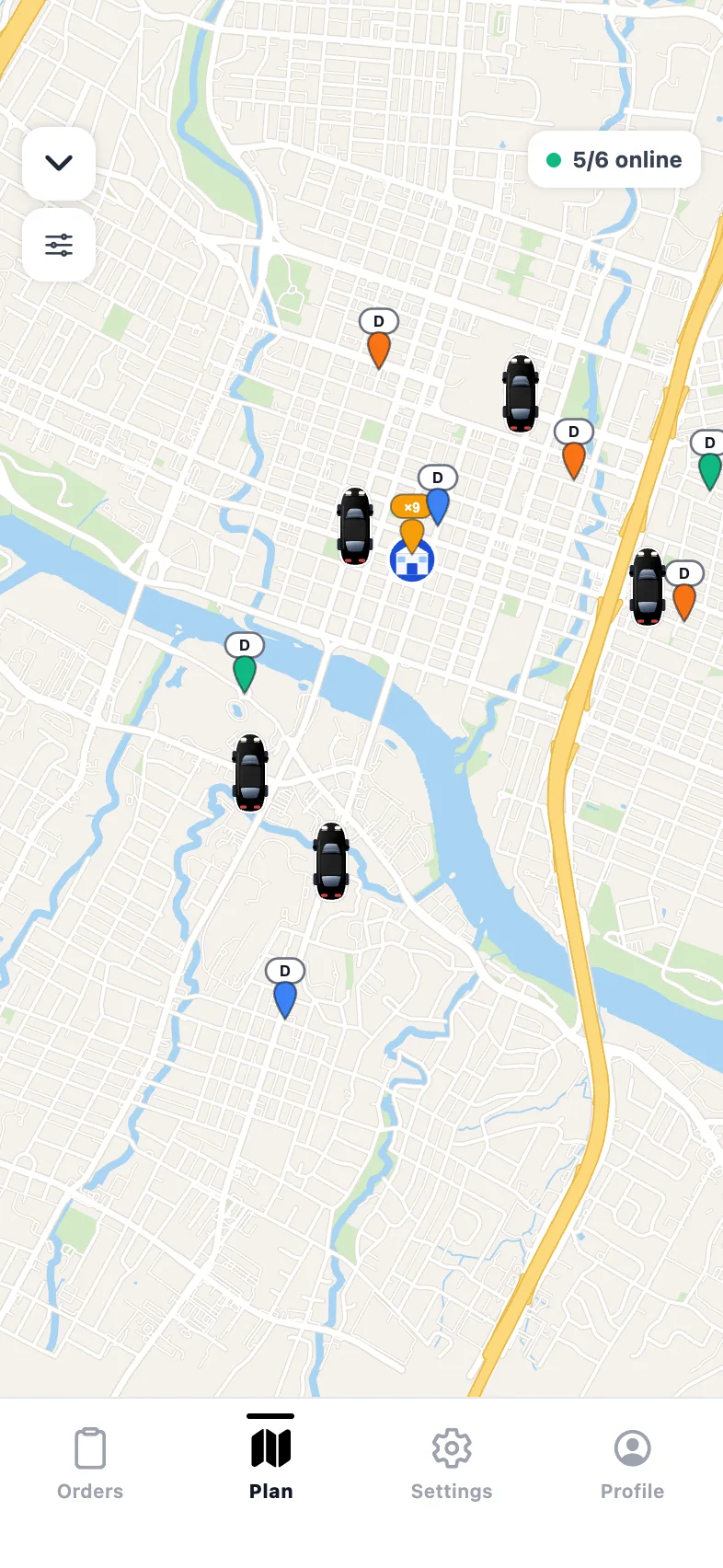
Admin app · Live map
Drivers and stops on the map, from wherever you are.
Why route planning matters
What it changes on a delivery day.
A timeline, not just pins
Every driver's stops laid out against the hours of the day with travel time between them, so an overloaded afternoon is obvious while you can still move a stop.
Optimization you approve
One tap proposes a shorter stop order. You see it as a list and on the map next to the current plan, change what local knowledge says is wrong, then apply.
Constraints it actually knows
Delivery windows, vehicle capacity, driver skills and zones are part of the plan — not assumptions the solver had to make on its own.
Replan mid-morning for free
Three orders land at 11am? Re-sequence in seconds. The driver's app updates and every downstream ETA recalculates.
How it works
Route planning in PrivateMile.
01
Get the day onto one board
Orders arrive from your store, an import, the API or typed in. Each is geocoded, carries its delivery window, and lands on the same board as everything else.
02
Group, then optimize
Split the day by zone or drag stops onto drivers, then ask for a shorter order. The proposal respects windows and capacity, and shows you what changed.
03
Review on the map, then apply
Compare proposed against current side by side. Move the two stops you know better than the solver does. Apply, and drivers see the new order immediately.
Planning is arithmetic, not geography
A route that looks tidy on a map can still be impossible by 2pm. The useful question is not whether stops are close together but when a driver reaches each door — average service time plus drive time, multiplied across the day, measured against the last window you promised.
That is why planning in PrivateMile is a timeline as well as a map. Each driver’s day is laid out against the hours with travel time between stops, so a day that runs past its last window is visible in the morning rather than at 4pm.
What the optimizer is told
Most disappointment with route optimization traces back to a constraint the solver never knew about. PrivateMile plans with the ones that decide whether a day is achievable:
- Delivery windows on each order, as a hard constraint on the proposal.
- Service time at the stop, so the plan reflects how long the door actually takes.
- Vehicle capacity, so a route can physically be loaded.
- Zones and driver rules, so the right person gets the run they are equipped for.
- Depot and warehouse returns, for operations that reload mid-day.
Propose, review, apply
Optimization proposes. A dispatcher decides. The proposed order appears as a list and on the map beside the current plan, with the changes marked, and nothing reaches a driver until you apply it.
This matters more than it sounds. A tool that silently re-sequences the day will eventually make one confident, expensive mistake — the school delivery that had to land before the bell, the loading bay that closes at three — and after that nobody trusts it. Reviewing takes about ninety seconds and keeps the feature in use.
The day does not stop for the plan
Real days change. Orders arrive late, a customer reschedules, a van breaks down. Re-optimizing a partly completed route is a routine operation here, not a reset: completed stops stay done, the remaining ones re-sequence, the driver’s app updates, and the customer’s tracking page shows a new ETA without anyone making a phone call.
Also in the box
And everything else, on every plan.
Zones & warehouses
Multi-depot operations with geofenced service areas.
Bulk import
Up to 2,000 orders per CSV with per-row error reports.
Live GPS tracking
Every driver on one map, updating in real time.
Analytics & reports
On-time rates, driver leaderboards, scheduled exports.
Does route optimization respect delivery windows?
Yes. Windows are a constraint on the proposal, not something checked afterwards. A stop with a 9–11am window will not be sequenced into the afternoon, and if the day cannot fit its windows the plan shows you where before you apply it.
Can I plan for multiple drivers at once?
Yes. Plan the whole day across every driver, with stops grouped by zone or balanced by load, and see all of them on one timeline and one map.
What happens to the plan when orders arrive mid-day?
Add them and re-optimize. Re-sequencing costs nothing, the driver app updates in under a second, and ETAs recalculate for every remaining stop.
Is route optimization included on the starting plan?
Yes. Every feature is on every plan, including the $150/month one. There is no routing add-on and no higher tier to unlock it.
More features
The rest of the platform.
See it with your own orders on the board.
Import today’s deliveries, add your drivers, and run one real day on the 15-day trial — no card, no sales call required.
Questions first? Tell us about your delivery day — or sign in.